Email marketing that gets out of your way.
Import your people, write a beautiful email, and hit send — EmailFig handles the rest.
No credit card required.
Everything a newsletter needs. Nothing it doesn't.
Your audience, organized
Lists, tags, and custom fields that stay tidy. CSV imports that catch typos, duplicates, and disposable addresses before they hurt you.
Templates that look right everywhere
A drag-and-drop editor with MJML underneath, so your email renders cleanly in every inbox. Test sends before the real thing.
Deliverability built in
Send from your own domain with guided DKIM and SPF setup. Bounces and complaints are monitored so your reputation stays ripe.
Campaigns without ceremony
A five-step flow: details, audience, template, content, review. Send now or schedule — and cancel before it's out the door.
Analytics that matter
Opens, clicks, and engagement over time — per campaign and across your account. No vanity dashboards.
Kind to subscribers
One-click unsubscribe, automatic suppression lists, and a view-in-browser link in every send. Respect is a feature.
Three steps to sent
Import
Bring your subscribers over with a CSV. EmailFig cleans as it imports and sorts people into the right lists.
Compose
Start from a template or blank canvas. Merge tags personalize every message; a test send checks the fit.
Send
Ship it now or schedule it. Watch opens and clicks roll in, with deliverability minded in the background.
Have a look around
Real screens from the app — no mockups.
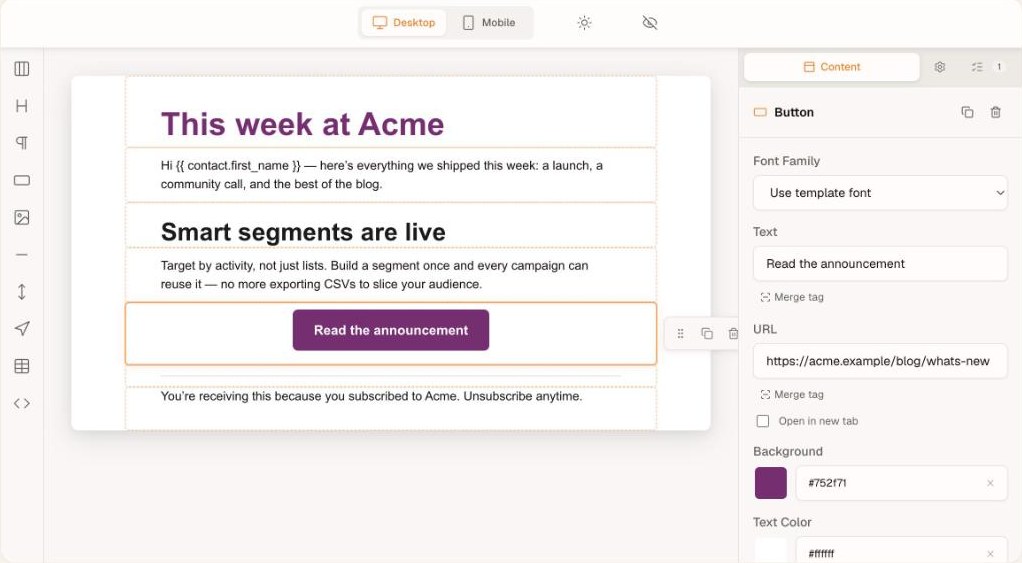
Build emails without touching HTML
Drag blocks onto the canvas, tune colors and copy in the inspector, and personalize with merge tags. MJML under the hood means it renders cleanly in every inbox.
- ✓ Drag-and-drop blocks with desktop & mobile preview
- ✓ Merge tags for personalization
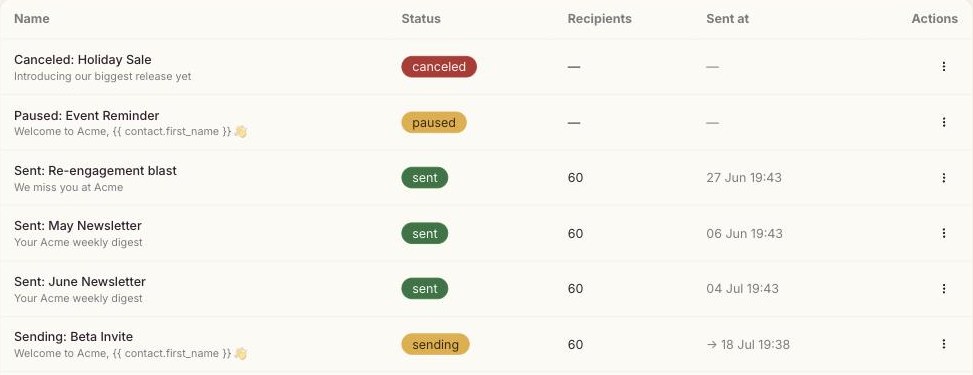
Every campaign, from draft to delivered
Statuses you can read at a glance — sent, sending, scheduled, paused. Duplicate what worked, schedule the next one.
- ✓ Five-step flow with a review safety net
- ✓ Send now or schedule for later
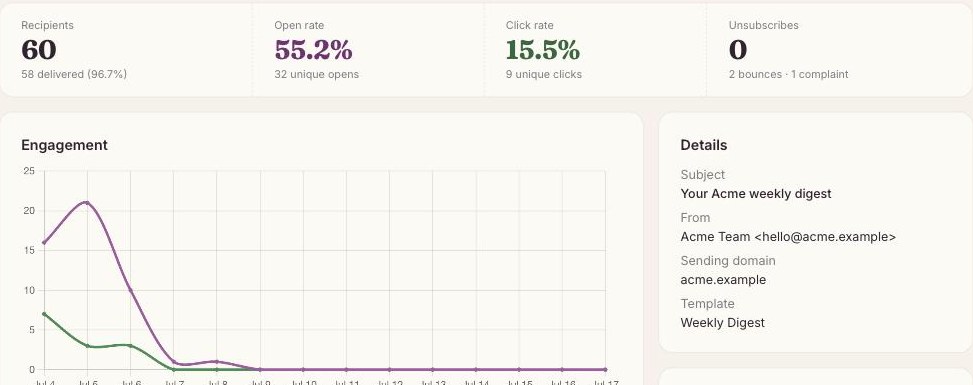
Reports that tell you what mattered
Delivery, opens, clicks, and the exact links people clicked — per campaign, without the vanity metrics.
- ✓ Unique clickers per link
- ✓ Recipient-level activity export
“Good email is like a ripe fig — worth waiting for,
and gone in a moment.”
Grown for newsletters that care
Pricing that scales when you do
Every feature on every plan. Start free, upgrade when your audience outgrows it.
Free
- ✓ Up to 4,000 subscribers
- ✓ 40,000 emails per month
- ✓ Every feature — nothing gated
- • EmailFig branding on emails
Sprout
- ✓ Up to 5,000 subscribers
- ✓ 50,000 emails per month
- ✓ Every feature — nothing gated
- ✓ No EmailFig branding
Orchard
- ✓ Every feature — nothing gated
- ✓ No EmailFig branding
- ✓ Your own sending domain
$20 per 10,000 subscribers. Change or cancel anytime.
Loved by people who press send
“EmailFig replaced three tools for us. Import was painless and our open rates went up the first month.”
“The deliverability setup actually explains what DKIM and SPF are doing. First platform that didn't make me feel dumb.”
“I schedule a campaign every Friday and it just… goes. No surprises, no drama. That's the whole review.”
Questions, answered
Yes — import a CSV and EmailFig maps your columns, catches duplicates and typos, and files people into the right lists. Suppressed and unsubscribed contacts stay suppressed.
Every delivered campaign email. Your allowance is 10× your subscriber count each month — enough for a couple of sends a week — and test sends to yourself don't count.
You can start on shared infrastructure right away. When you're ready, connect your own domain and EmailFig walks you through DKIM and SPF — most domains verify in minutes.
No catch: all features, up to 4,000 subscribers. Emails carry a small “Sent with EmailFig” line in the footer, which goes away on Orchard.
Anytime. Your contacts and campaign stats export to CSV with one click, and cancelling stops billing at the end of the cycle.
Ready when you are.
Free up to 4,000 subscribers — set up your audience and send your first campaign today.